Showing posts with label November. Show all posts

Friday, November 15, 2019

Active Learning

Active Learning


The image above is a great example of how education has evolve over time. From the Colonial Era to most recently, there have been major  changes in education. Before, the expectation was that students remained seated, in rows, and listened to the teacher lecture a lesson. Then, students began sitting in tables, participated in small group discussion, but mostly had to listen for teacher direction and instruction. Now, with the 21st Century Skills (creativity, critical thinking, collaboration & communication)  in place, there has been a huge shift in education. In several places, one might not see students siting in rows, tables or at all. Students will engage more in individualized instruction and work on different skills that others are not necessarily working on. In these learning and innovated spaces we will probably see something similar to the following picture:

Image Source: @ViewSonic

In this image, we see the instructor delivering instruction via a Smartboard or Smart TV. As he guides students through the lesson, students are located in different parts of the room, which is something very different from the traditional setting. Students are actively engaged in the lesson and perhaps learning at their own pace or level. This is part of active learning, which we will learn in the next section.

What is Active Learning?

Active learning  involves teaching methods and strategies that engage students in the material in a meaningful way. Students will engage in small group or whole group activities that are centered around writing, listening, speaking, problem solving and reflecting. The following is a great example of some of the strategies that can be implemented to make active learning happen:

In this spectrum of active learning activities, we see the rigor from basic activities that perhaps do not involve so much time, to more rigorous and complex activities. Overall, we see students participating in active learning activities that provide opportunities for learning, applying , synthesizing and getting involved in discussion. 

My Experiences with Active Learning
Kagan Professional Development kagan kaganaded kaganonline GIF
Image Source: Via GIPHY

I currently work in a district that supports Kagan Structures. The Kagan structures include several of the active learning strategies previously mentioned. Some of these are: Think-pair-share, inside-outside circle, all write round robin and several other more. Kagan strategies are part of active learning, as these also follow structures that are different from the traditional instruction. When using Kagan structures, students actively participate and engage in learning. Students end up doing the hard work and the teacher essentially functions as a facilitator.

Through the use of SeeSaw, I would create portfolios for different subject areas. In these portfolios I would add stories, images, videos and student samples to give students the opportunity to access different information. Some of the projects involved working with a partner and having students record about their projects. Students really loved reading my comments or even comments from their parents. SeeSaw gave my students the opportunity to explore a variety of digital tools and enhance their learning.

Exploring Active Learning

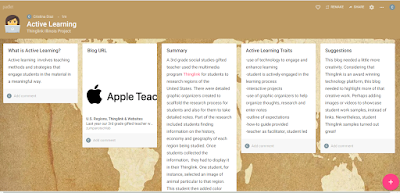
This week, I looked at a blog called U.S. Regions, Thinglink and Websites. The blog was originally designed for an elementary school to show the work of a 3rd grade gifted teacher who taught social studies curriculum. In the blog, the teacher shared about the steps students took to research on the region being studied. Students first used a graphic organizer to help them with notes and the things that needed to be displayed in their Thinglink. After students did the research and developed their Thinglink, they had to create a 5 page website. Part of this 5 page website require for students to add all the previous projects they had completed. The use of technology, and specially the Thinglink platform, created a hands on opportunity for students to be actively engage in learning.

Until viewing this blog, I had no idea that such an amazing technology platform like Thinglink existed. The fact that students add their personal touch, have a fun purpose for doing research and showcase their learning in an innovated way makes me want to use this platform right away. If you are as interested as I am in learning and using  Thinglink in your classroom or for your teachers, please see the following video:

Video Resource: YouTube

Please checkout the Padlet I created to summarize my learning about the 3rd grade teacher's blog and active learning:

Resources:

Center for Educational Inovation. "Active Learning." Website at https://cei.umn.edu/active-learning


SeeSaw https://web.seesaw.me/

ThingLink Turotial and How to Use in Classroom Video at https://www.youtube.com/watch?v=1yrcCE4RK1s

ViewSonic Education Blog (2018). "How to Implement Active Learning for Classrooms." Blog at

Wednesday, November 13, 2019

HyperDocs

Image Source: Laura Moore

Image Source: Lisa Highfill

What is a HyperDoc?
According to the co-creators, Lisa Highfill and Sarah Landis, HyperDocs are “Google Docs that contain innovative lessons for students.” This 21st Century worksheet, as Highfill refers to, is a hyperlinked document that allows for students to access lessons, instructions and many other innovative tasks.

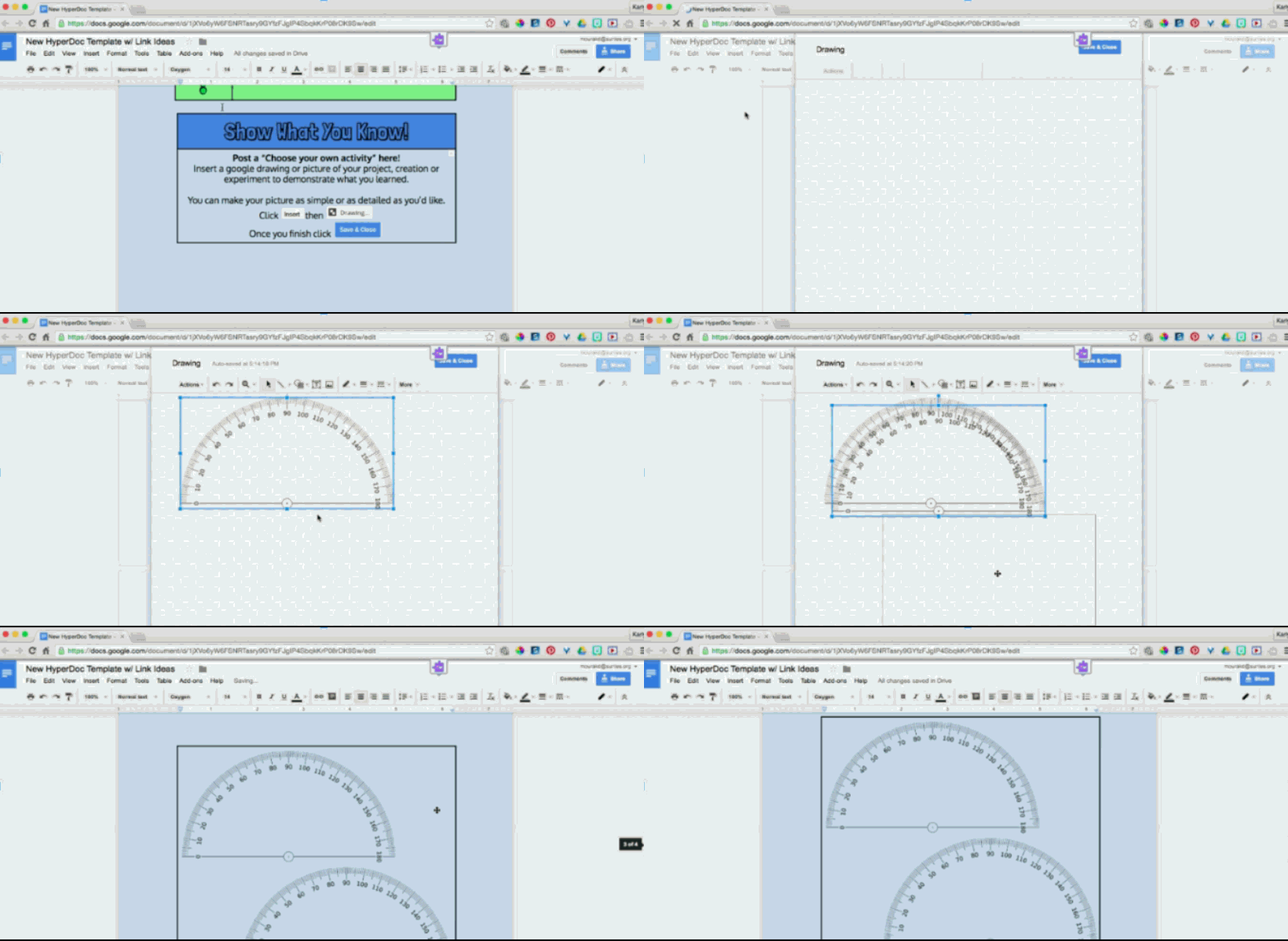
Before doing my research, I was curious to find out what a HyperDoc was. I imagined that the part "Doc," probably derived from the word document, which in reality it did. So, I then had to figure out what the rest of the word meant. As I read through some of the research, I learned that a HyperDoc was beyond a digital worksheet. A HyperDoc allows for students to engage in collaborative,  interactive and trans-formative instruction. If you decide to use a Google Document template, for instance, you can customize that template by adding links, images, videos and instructions. Once you decide on the content and design of your Google Document, you will make a copy and share the link with your students. At their own pace and selection, students would be guided through the lesson by going through different tasks.

docs GIF
Image Source: Via GIPHY


Still not sure about using HyperDocs?
What if I told you that you could personalized student learning? Well, then try HyperDocs! HyperDocs give you the opportunity to be the lesson designer and get creative with your instruction. As the lesson designer, you determine the lesson components that you would like to address, as well as how much in depth you would like to cover instruction. As the lesson designer, you also get to select and differentiate among the many options that best meet the needs of your students.


To see my example of how to create a HyperDoc, please click on my presentation:


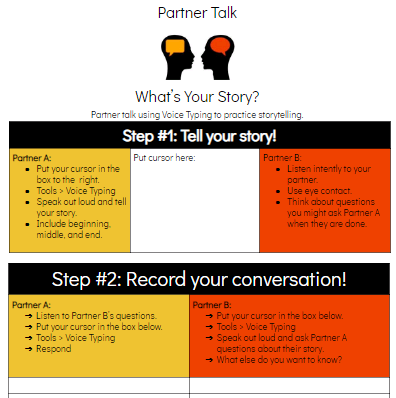
The following are some examples of HyperDocs:


For different HyperDoc templates, Click Here.


Remember learning about the SAMR Model in one of my previous blogs?
Well, the following is a perfect example of how HyperDocs fit in to the SAMR Model.
@ HyperDocs created by HyperDocs, LLC

Are you ready to create your own HyperDoc?
You can view the following video to learn more about HyperDocs and also how to create your own HyperDoc.
Video Source: YouTube


Hope you learned about HyperDocs and had fun learning about this interactive, trans-formative and personalized digital tool!

Resources:


Fiction vs. Nonfiction (Slides)


HyperDoc about Sound by Stacy at http://www.madewithloveteaching.com/2017/08/hyperdocs-for-primary-classroom.html

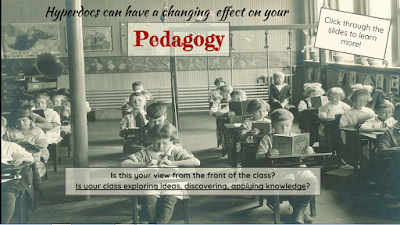
HyperDocs can have a  changing effect on your Pedagory by Lisa Highfill. Google Slide Presentation at https://doc.google.com/presentation/d/1RjyUI_z7asWMWpoP3LbQWwR8sKp37wo88fMyewKlv

HyperDoc Checklist- a self evaluation tool for revising your digital lessons. Document at 

HyperDocs for Secondary by Laura Moore at https://www.sutori.com/story/hyperdocs-for-secondary--8dvHoH9kfQiEsTJFzk8s4NzB


Jennifer Gonzalez, 2017. "How HyperDocs Can Transform Your Teaching." Cult of Pedagogy Website at https://www.cultofpedagogy.com/hyperdocs/

Lisa Highfill, 2014. "HyperDocs- Changing Digital Pedagogy." Google Academy Website at https://sites.google.com/a/googleteacheracademy.com/2014-07-30/agenda/room3


Rachel Bennet, 2017. "What Is a HyperDoc? And How Do I Make One.? YouTube Video at 


Thursday, November 7, 2019

Mapping My Digital Space
Rainbow Hello GIF by Alex Bobeda
Source Via: GIPHY

Visitor vs. Resident of the Internet

Did you know that when  using internet tools we develop a digital space? Within this digital space, we can be either a digital visitor or a digital resident.The terms digital visitor and digital resident were developed by the author David White, who wanted to describe how people interacted with digital spaces. In a video called "Visitors and Residents Mapping Activity," White explains that a digital visitor is someone accessing the internet for a specific task, such as a Google Search. When a person googles something, they are probably brought down to a list of links related to their search. The initial information goes away, not leaving a trace behind. Contrary to this, would be a digital resident who leave a trace behind of his or her work, as some like to refer to a "footprint." A digital resident would be a person posting on social media or joining an online discussion.

While a person can be either a digital resident or a digital visitor, they can also a combination of both. These digital spaces would be based on the online tools, resources, media and social networks that people use in their daily lives.

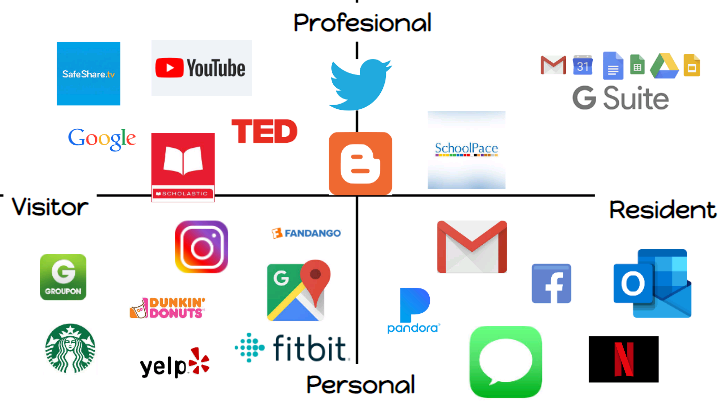
In order to determine whether one is a digital visitor, a digital resident or a combination of both, White provided a mapping activity that broke down the digital spaces into four quadrants. These quadrants were based on personal and professional areas, as well as interests, preferences and habits of digital spaces. Please refer to the example of  my digital space map in the following section.

Mapping my Digital Space


Image Source: Google Search

Mapping my Digital Space was such a fun an interesting task! At first, I had no idea of where to start. So, I went ahead and pulled my iPhone to see the apps I had downloaded. Voila!! I discovered that I had many apps and that not all fell under the same category. I thought about which apps I used more often, and whether I used them for personal or professional interests.

In my discovery, I realized that I had too many apps on the personal side, and not that many on the professional side. This observation began to worry me, but I then saw it more as a learning experience, rather than on something I was doing right or wrong. I also realized that since my profession requires doing research, analyzing and recording data, I had some tools that perhaps for some people might fall more on the visitor side. For instance, SchoolPace, which is a reading assessment and data tool offered by the American Reading Company (ARC). This is an internet tool I often  have to refer to by checking daily or weekly data, and then leaving notes for teachers.

My hope is to begin developing more tools on the professional quadrants and use this amazing activity to get to know my teachers, as well as students. Hope you also find it useful. Thank you!

References:

David White, 2011. "Visitors and Resdents." Digital-Learning-Culture at http://daveowhite.com/

David White 2013. "Visitors and Residents Mapping Activity." Youtube Video at 

Robert Schuetz, 2016. "Mapping our Pangea: Visitors and Residents." Knocking the Arrow, at https://www.rtschuetz.net/2016/02/mapping-our-pangea.html

Robert Schuetz, 2016. "Visitors and Residents; Mapping our Digital Learning Places." IETC V and R Google Slide Presentation at https://docs.google.com/presentation/d/1H7t_QxeWXhltcXahy5lETY-nHD-zOQdaW07tlK-_mK4/edit#slide=id.g18c752de78_3_26